Latest version · v1.0.0

IP Assistant

Switch Windows network configurations in seconds

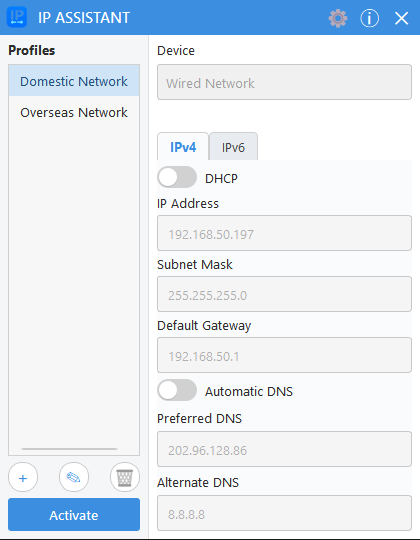
Save multiple IPv4, IPv6, gateway, and DNS configurations for each network adapter and activate them from the main window or system tray.

Latest version
v1.0.0
System requirements
Windows 10 x64 / Windows 11 x64
Release notes
July 28, 2026
License
MIT

Features

  • Create multiple network profiles for different adapters
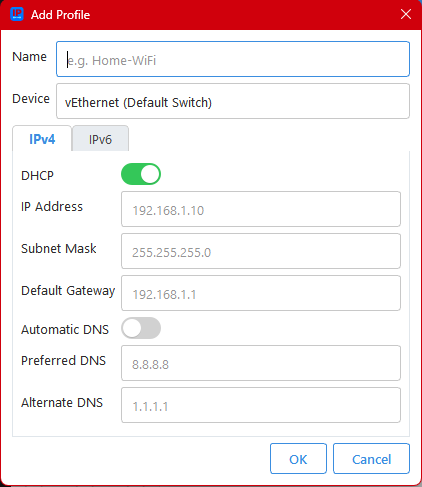
  • Configure IPv4, IPv6, default gateways, and DNS
  • Bind profiles to stable network-adapter GUIDs
  • Attempt automatic rollback when activation fails
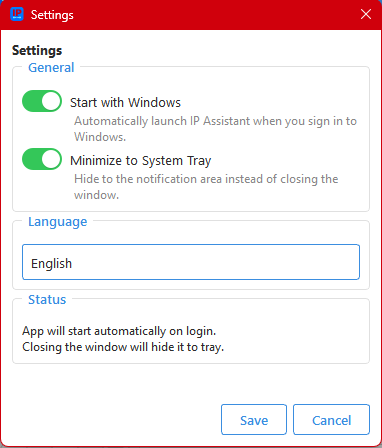
  • Use Windows startup and system tray shortcuts
  • Choose from 18 interface languages

System requirements

  • Windows 10 or Windows 11, 64-bit
  • Administrator privileges when installing the service
  • Switching configurations may briefly interrupt the active connection

SHA256 checksum · 19.3 MB

Screenshots

IP Assistant main window
Add a network profile
IP Assistant settings

The IP Assistant graphical interface runs with standard user privileges. A Windows service performs privileged network changes, so daily profile switching does not repeatedly trigger UAC after the service is installed.

Profiles are stored in data/profiles.json under the application directory. The uninstaller preserves this directory by default during upgrades or reinstalls.